# Hacktoberfest Host Guide

This is the guide for hosting an in-person Hacktoberfest event (a “Fest”) with MLH. It covers the two Fest formats, what support is available, and the steps to plan, run, and close out your event. This year, our goal is to bring people together to learn, experiment, and build with open-source and open-weight AI technology.

> **Apply to host a Fest:** [**https://hacktoberfest.com/host**](https://hacktoberfest.com/host)

{% hint style="info" %}
**Event requirements:** All Fests are in-person events that take place on a single day. Hacktoberfest Hack Days must be free to attend and run for 3 to 12 hours; four to six hours is ideal.
{% endhint %}

{% hint style="info" %}
**Required for every format: Attendee registration and check-in must use OrganizerHQ, our event management platform, and hosts must provide event photos after their Fest.**
{% endhint %}

### Two Fest Formats

Fests come in two formats and you get to choose:

### Hacktoberfest Hack Day

Hacktoberfest Hack Days are mini-hackathons based on Major League Hacking (MLH)'s [Hack Days program](https://mlh.gitbook.io/hack-days). These are hands-on events where participants create projects during the Fest using open-source AI tools or open-weight models for a chance to win prizes.

MLH supports these events with:

* A Hacktoberfest event pack, normally including T-shirts, stickers, postcards, and other promotional materials, subject to availability
* [Reimbursements under the program policy](/reimbursements)
* The [Best Open-Source AI Project challenge](/fest-planning-guide/open-source-prize-categories), with a DEV Badge for every member of the winning team and a participation badge for all attendees; depending on availability, MLH may also provide MLH+DEV branded swag bags for the winning team
* A possible additional [Hack Days partner prize category](/hack-days-partner-modules) assigned to selected Hacktoberfest Hack Day events

### Hacktoberfest Meetup

Hacktoberfest Meetups are flexible in format, and we rely on you, the host, to shape them in the way that best serves your community. For example, you could invite a speaker to talk about open-source AI, or host a simple Meetup where participants share ideas about their builds and their latest AI-assisted workflows in a more social setting.

All Hacktoberfest Meetup events are subject to approval. They do not use project submissions or prize challenges. Like Hack Days, they are eligible to receive a Hacktoberfest event pack, normally including T-shirts, stickers, postcards, and other promotional materials, subject to availability. They do not receive prizes or reimbursements from the MLH Hacktoberfest team.

## How Hosting Works

{% stepper %}
{% step %}

## <sub>Apply to host a Fest</sub>

Fill in the details of your event and your contact information at [hacktoberfest.com/host](https://hacktoberfest.com/host). If you want to host a Hacktoberfest Meetup, share your plans for the format of the event. All Fests are subject to approval to be listed officially on the Hacktoberfest website.
{% endstep %}

{% step %}

## <sub>Receive approval and your official event name</sub>

Approved events will use the following naming convention: `Event Name - Location [Event Type]` (i.e. Hack the 6ix - Toronto, Canada \[Hack Day]).
{% endstep %}

{% step %}

## <sub>Secure an in-person venue</sub>

Your in-person event needs a safe, accessible space for its full program, with the equipment your program requires. Examples include AV equipment, seating, power, and reliable Wi-Fi.
{% endstep %}

{% step %}

## <sub>Plan the experience</sub>

Hacktoberfest Hack Day hosts can follow our [Fest Planning Guide](/fest-planning-guide), which outlines the requirements and best practices for a Hacktoberfest Hack Day. Hacktoberfest Meetup hosts plan their own talks, workshops, discussions, or other programming.
{% endstep %}

{% step %}

## <sub>Receive and distribute swag</sub>

Both Fest formats are eligible to receive Hacktoberfest swag, subject to availability. Some Fests may also receive special swag drops. Follow the event's onboarding instructions when distributing the materials you receive.
{% endstep %}

{% step %}

## <sub>Run the event and follow the post-event instructions</sub>

Every Fest must use OrganizerHQ for attendee registration and check-in, and every host must provide event photos. Hacktoberfest Hack Day events must also use OrganizerHQ Challenges for project submissions and winner selection, record winners, and make the project gallery public before announcing results. Hack Day hosts submit receipts through the supplied reimbursement workflow after the event; prize distribution and reimbursement happen separately.
{% endstep %}
{% endstepper %}

## <sub>For More Information</sub>

Start with [Fest Formats](/fest-formats) to learn about the two event types. Then use the [Fest Planning Guide](/fest-planning-guide) to work through the hosting process.

For questions about applying or hosting, contact <hacktoberfest@mlh.io>.


# Fest Formats

Every approved Hacktoberfest event uses one of two Fest formats, which you choose when you apply. The support from MLH and your responsibilities as a host vary by format.

Use this simple test when choosing: if participants will build and submit projects, go with a Hack Day. If the program will consist of talks, demonstrations, discussions, social activities, or workshops, choose a Meetup.

| Format                 | Event Name                                             | What it is                                                                                                        | MLH Support                                                                                                                                                                                                         |
| ---------------------- | ------------------------------------------------------ | ----------------------------------------------------------------------------------------------------------------- | ------------------------------------------------------------------------------------------------------------------------------------------------------------------------------------------------------------------- |
| Hacktoberfest Hack Day | `{Organization or Event Name} - {Location} [Hack Day]` | A hands-on event modeled on the [Hack Days program](https://mlh.gitbook.io/hack-days)                             | A Hacktoberfest event pack, subject to availability; [reimbursement under the current policy](/reimbursements); the Best Open-Source AI Project challenge; and a possible assigned Hack Days partner prize category |
| Hacktoberfest Meetup   | `{Organization or Event Name} - {Location} [Meetup]`   | A flexible community event that could include talks, workshops, discussions, demonstrations, or social activities | A Hacktoberfest event pack, subject to availability; prizes and reimbursement are not provided                                                                                                                      |

## Hacktoberfest Hack Day

Hacktoberfest Hack Days run for 3 to 12 hours, although four to six hours is ideal. Participants create and submit projects during the event for the [Best Open-Source AI Project challenge](/fest-planning-guide/open-source-prize-categories). Use the [MLH Standard Hackathon Rules](https://github.com/MLH/mlh-policies/blob/main/standard-hackathon-rules.md) as the default for your event: project-specific work happens during the Hack Day. If a different approach better suits your event, explain it clearly before project work begins.

The challenge has one winning team, and every member receives a DEV Badge on their DEV account. Depending on availability and your event's onboarding instructions, MLH may also provide MLH+DEV branded swag bags for the winning team. The host selects the winner using the challenge guidance.

Some Hacktoberfest Hack Day events will also receive a Hack Days partner prize category. These categories are assigned by the MLH Hacktoberfest team. See the [partner challenge details](/hack-days-partner-modules).

### Prize Tracks

| Prize class                           | Who selects it?                                                                                                | Prize                                                                                                                     | Who fulfills it?                     |
| ------------------------------------- | -------------------------------------------------------------------------------------------------------------- | ------------------------------------------------------------------------------------------------------------------------- | ------------------------------------ |
| Best Open-Source AI Project challenge | Included at every Hacktoberfest Hack Day                                                                       | Every winning team member receives a DEV Badge; MLH+DEV branded swag bags may also be provided, depending on availability | MLH sends the prizes after the event |
| Hack Days partner prize category      | The MLH Hacktoberfest team assigns it to selected Hacktoberfest Hack Day events; you may indicate a preference | The category-specific prize stated in the assigned event instructions                                                     | MLH sends the prize after the event  |

For either prize class, use the applicable challenge guidance to select the winning team.

## Hacktoberfest Meetup

Hacktoberfest Meetup events are intentionally flexible. You might invite a community member or group to give a talk, run a workshop, host an informal discussion, or bring people together for a social event. The program should support Hacktoberfest's mission of open-source and open-weight AI education.

Hacktoberfest Meetups do not use project submissions or prize challenges. They are eligible to receive Hacktoberfest swag, subject to availability, but do not receive prizes or reimbursement.

{% hint style="info" %}

* Both formats must be in-person events that take place on a single day. Hacktoberfest Hack Days must be free to attend. Participants who prefer to engage online should visit [Hacktoberfest.com](https://hacktoberfest.com/) to see the virtual challenges and content available.
* Attendee registration and check-in through OrganizerHQ and post-event photos are required for both formats.
* All events must follow their event-specific instructions supplied after approval by the MLH Hacktoberfest team for registration, check-in, reporting, reimbursement, branding, and swag.
  {% endhint %}

For questions about applying or hosting, contact <hacktoberfest@mlh.io>.


# Reimbursements

*Last reviewed: 24 September 2026.*

Reimbursement is available only for approved `Hacktoberfest Hack Day` events hosted by individuals, school clubs, or community organizations. Corporate hosts and `Hacktoberfest Meetup` events are not eligible.

## Before You Request Reimbursement

Before requesting reimbursement, make sure you can confirm all of the following:

* Your event was approved as a `Hacktoberfest Hack Day`, was free to attend, and took place entirely in person.
* Each attendee was checked in through OrganizerHQ while physically present at the venue. Registrations, online participation, and advance or remote check-ins do not count.
* You completed the required event closeout steps, including the event summary and photos.
* Every requested expense is eligible, supported by a complete itemized receipt, and submitted through Ramp by the deadline in your approval or onboarding materials.

{% hint style="warning" %}
Your maximum reimbursement is the lower of your approved, itemized spending or your country's per-hacker rate multiplied by verified in-person OrganizerHQ check-ins, capped at 50 hackers. MLH cannot reimburse more than you spent.
{% endhint %}

## Submit Your Receipts

Keep a full itemized receipt for every purchase. MLH will invite you to submit receipts through Ramp, the finance platform used for Hack Day reimbursements.

Submit receipts by the deadline in your event approval or onboarding materials. If a Ramp invitation or deadline is missing, email <hacktoberfest@mlh.io> promptly so you do not miss the reimbursement window.

We offer different reimbursement rates depending on the country in which the Hacktoberfest Hack Day is organized; use the rate finder below. We list reimbursement amounts in USD here. Your reimbursement may be in either USD or your local currency, depending on your banking details and preferences in Ramp. The typical timeline is 30 days from submitting receipts, although it can take a few weeks more or less depending on individual circumstances.

## Eligible Expenses

Food, snacks, and non-alcoholic beverages are always eligible. Other event expenses may be eligible with advance approval. Email <hacktoberfest@mlh.io> before making an uncertain purchase. Excessive expenses, especially prizes or swag purchased independently, may be rejected.

## How the Maximum Is Calculated

MLH cannot reimburse more than the eligible amount actually spent. The maximum is the lower of:

* Your total approved, itemized event expenses
* The country-specific per-hacker rate multiplied by the number of verified OrganizerHQ check-ins, capped at 50 hackers

For example, a US event with 30 verified check-ins has a maximum allowance of 210 USD. If it has 165 USD in approved, itemized expenses, the maximum reimbursement is 165 USD.

## Find Your Reimbursement Rate

Search by country and enter the expected number of verified OrganizerHQ check-ins. The calculator shows the country allowance; the final reimbursement is still limited to approved, itemized spending.

{% @mlh-hack-day-schedule/hacktoberfest-reimbursement-rate-finder content="" %}

Rates were last updated on 24 September 2026. If your event approval lists a different rate, follow your approval and email <hacktoberfest@mlh.io>.

{% hint style="info" %}
If your country is not listed, email <hacktoberfest@mlh.io> before your event.
{% endhint %}


# Swag

Both Fest formats are eligible to receive a Hacktoberfest event pack. Availability, shipping eligibility, partner assignment, and event timing may affect whether your event receives physical materials. Event packs normally include T-shirts, stickers, and postcards and may include other promotional materials. Some events also receive surprise swag drops while supplies last. The MLH Hacktoberfest team will confirm the full contents and shipping timing for your approved event.

When T-shirts are included, quantities are limited. We send a set number for the Fest, so plan in advance how you want to hand them out. You may use them as prizes, share them with your hosting team and volunteers, or choose another approach that suits your event.

Sticker and postcard quantities are based on the expected number of attendees and may account for the difference between registrations and actual attendance.

{% stepper %}
{% step %}

## Before Delivery

* [ ] Confirm the delivery address and a reliable person to receive the shipment.
* [ ] Check that the recipient can accept deliveries during the expected shipping window.
* [ ] Plan how the swag will reach the venue.
* [ ] Tell the MLH Hacktoberfest team promptly if the address or event date changes.
  {% endstep %}

{% step %}

## At the Fest

* [ ] Decide when and how it will be distributed.
* [ ] Do not tell attendees that everyone will receive a T-shirt. Quantities are limited.
* [ ] Do not promise surprise swag drops or partner items unless they have been confirmed for your event.
  {% endstep %}
  {% endstepper %}

## Support by Format

* **Hacktoberfest Hack Day:** eligibility for a Hacktoberfest event pack, reimbursement under the current policy, DEV Badges for every member of the winning [Best Open-Source AI Project](/fest-planning-guide/open-source-prize-categories) team, possible MLH+DEV branded prize swag bags depending on availability, and any Hack Days partner prize category assigned to the event.
* **Hacktoberfest Meetup:** eligibility for a Hacktoberfest event pack. Hacktoberfest Meetup events do not receive prizes or reimbursement.

DEV Badges, prize swag bags, and other prizes are handled separately after the event; they are not part of the general event-pack distribution process. Mention physical prize swag bags to participants only if they are confirmed in your onboarding materials.


# Project Submissions and Winner Selection

This page applies to approved `Hacktoberfest Hack Day` events. OrganizerHQ Challenges is mandatory for every Hacktoberfest Hack Day event and cannot be replaced by another submission platform.

Use the [MLH Standard Hackathon Rules](https://github.com/MLH/mlh-policies/blob/main/standard-hackathon-rules.md) as the default: project-specific work happens during the Hack Day. If a different approach better suits your event, explain it clearly before project work begins.

## Confirm the Challenges

Every Hacktoberfest Hack Day runs the [Best Open-Source AI Project challenge](/fest-planning-guide/open-source-prize-categories). MLH adds it to your event automatically:

1. Open the public event page while signed in.
2. Select **Challenges** in the “View and submit challenges for this event” banner.
3. Confirm that the Best Open-Source AI Project challenge appears.
4. If the MLH Hacktoberfest team assigned your event a Hack Days partner prize category, confirm that it appears too.

If an expected challenge is missing, email <hacktoberfest@mlh.io>. Do not create a duplicate or add a partner category that MLH did not assign.

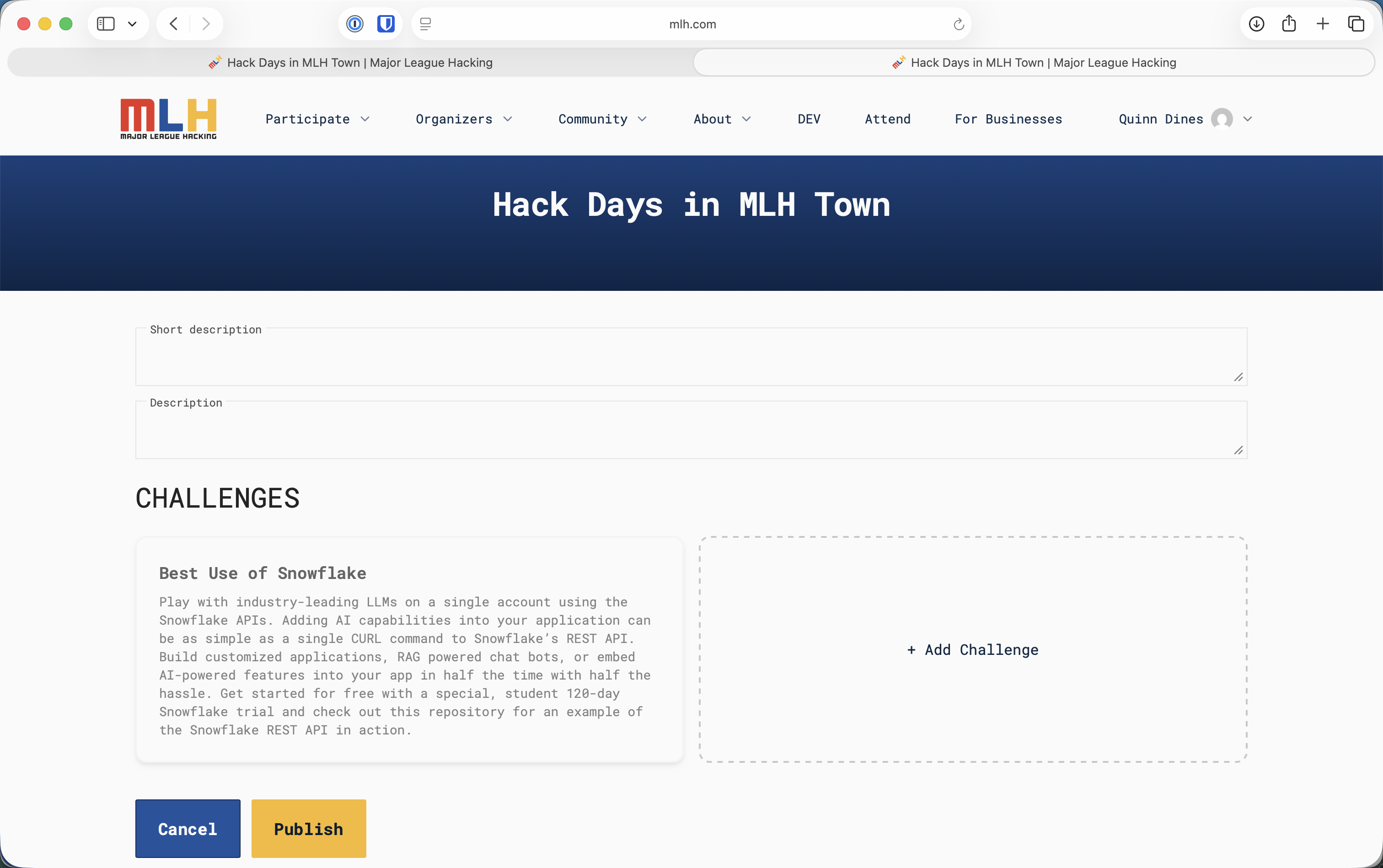
You may add an optional local challenge through **Edit Event → + Add Challenge**. Keep it separate from the MLH challenges, which appear automatically. Any local prize is provided by the host unless your event onboarding says otherwise.

## Set the Submission Window

You control when teams can submit:

1. Open the public event page while signed in.
2. Select **Manage Submissions**.
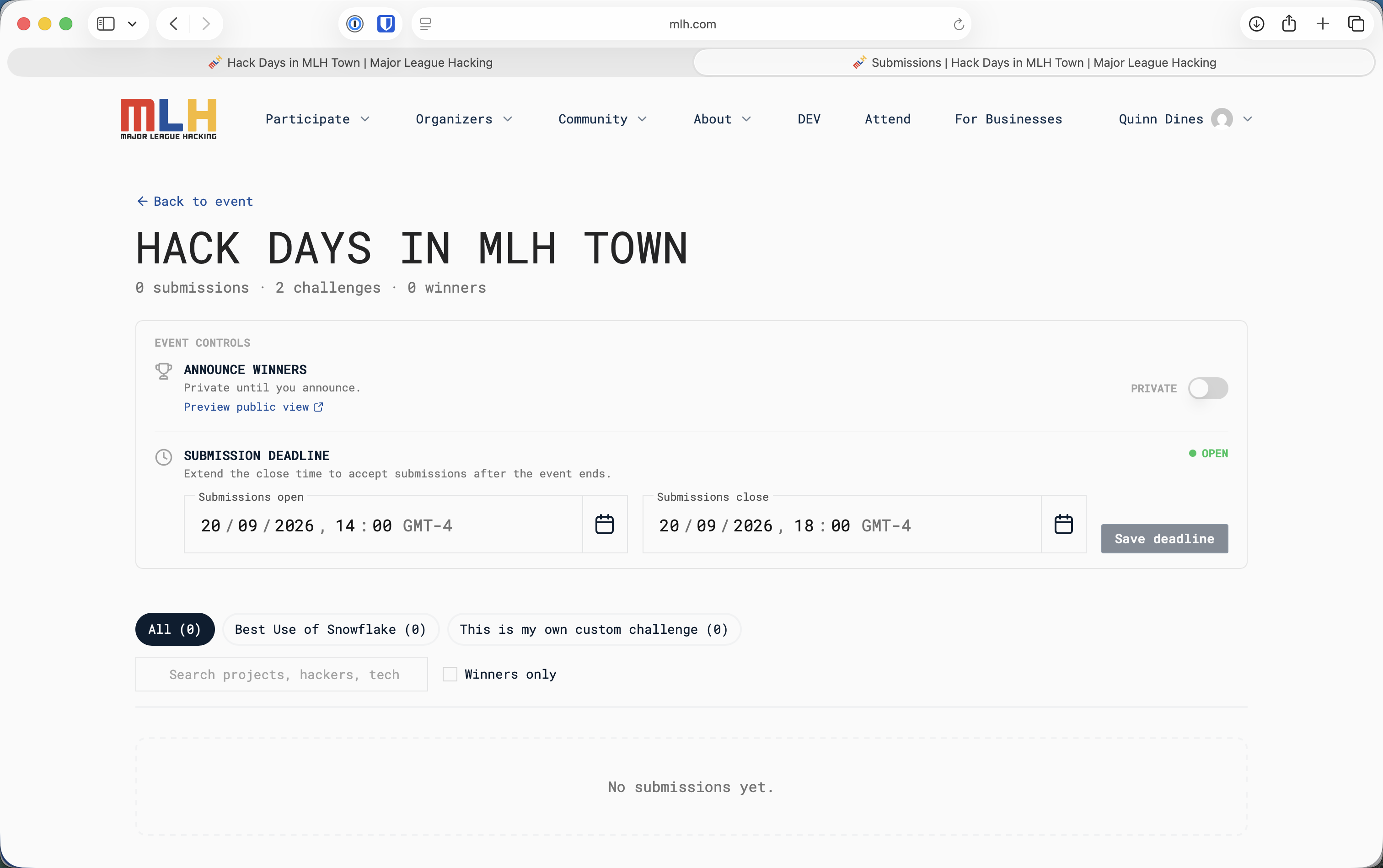
3. Under **Submission Deadline**, set the **Submissions open** and **Submissions close** date and time.
4. Select **Save deadline**.
5. Check the status at the right of the section. It shows **OPEN** while submissions are available.

Open submissions during project time and close them at the project deadline, before demos begin. If the deadline changes, update it here and tell every team.

<figure><img src="https://2418378681-files.gitbook.io/~/files/v0/b/gitbook-x-prod.appspot.com/o/spaces%2FYtpjvLijAu2exLXjlqsb%2Fuploads%2Fgit-blob-084b17d24e70dc160ad128530d5952896774a2d5%2Fmanage-submissions-empty.png?alt=media" alt="Manage Submissions page with controls for submission open and close times"><figcaption><p>Set and save the submission window from Manage Submissions.</p></figcaption></figure>

## Before Project Work Begins

Tell participants:

* The exact submission deadline
* The Best Open-Source AI Project challenge, any assigned partner category, and any optional local challenge
* When project work may begin
* The required project information
* The demo format and time limit
* How the winning projects will be selected
* That every project being considered for a prize must be submitted and select every challenge it is entering

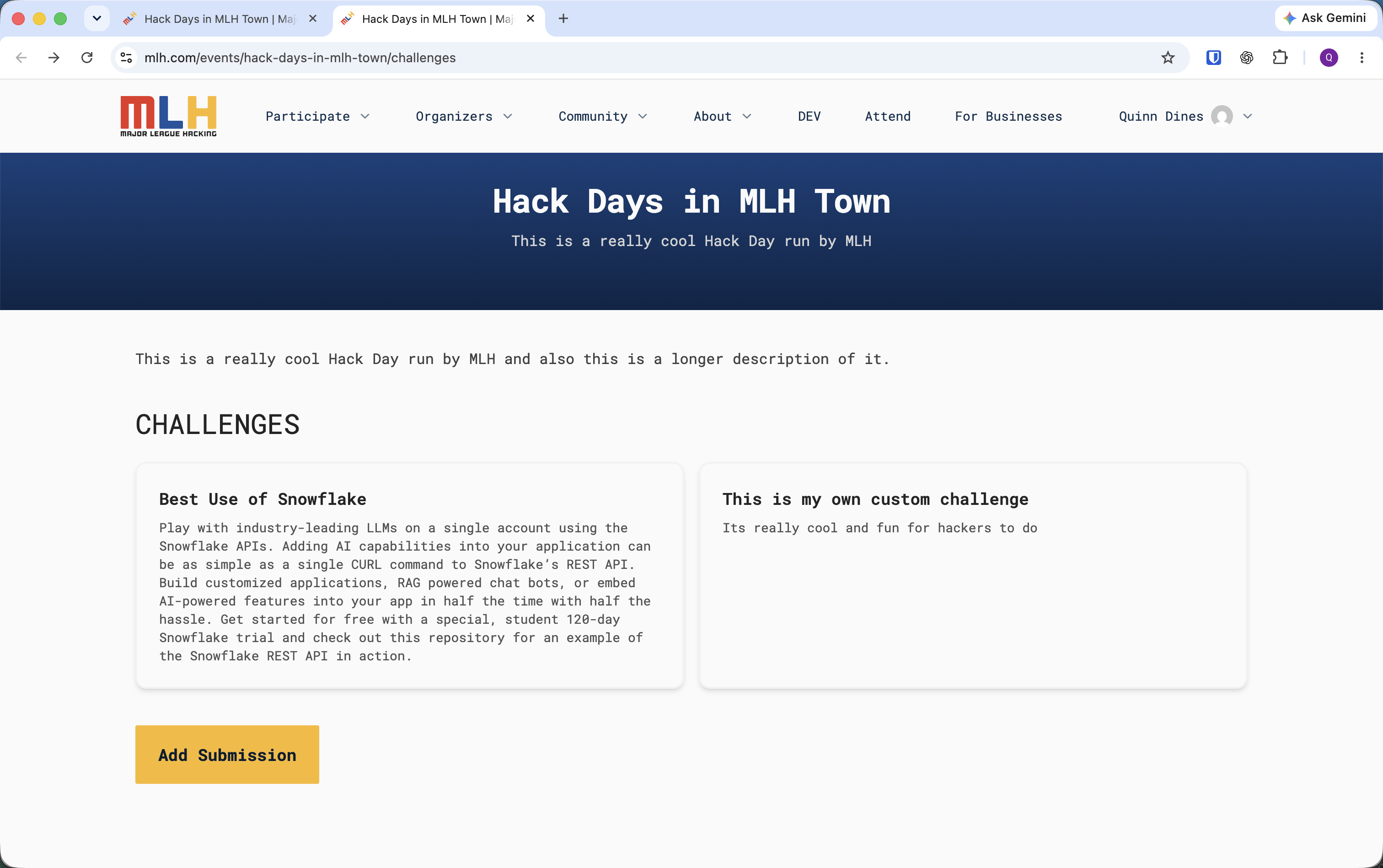
Open the **Challenges** page yourself and confirm that every category your event is running appears correctly. The **Add Submission** button becomes available only during the saved submission window.

## How Teams Submit Projects

Participants must register through OrganizerHQ and check in at the venue. One team member should then submit the project on behalf of the team:

1. Sign in using the account used to register for the event.
2. Select **Challenges** in the “View and submit challenges for this event” banner.
3. Select **Add Submission**.
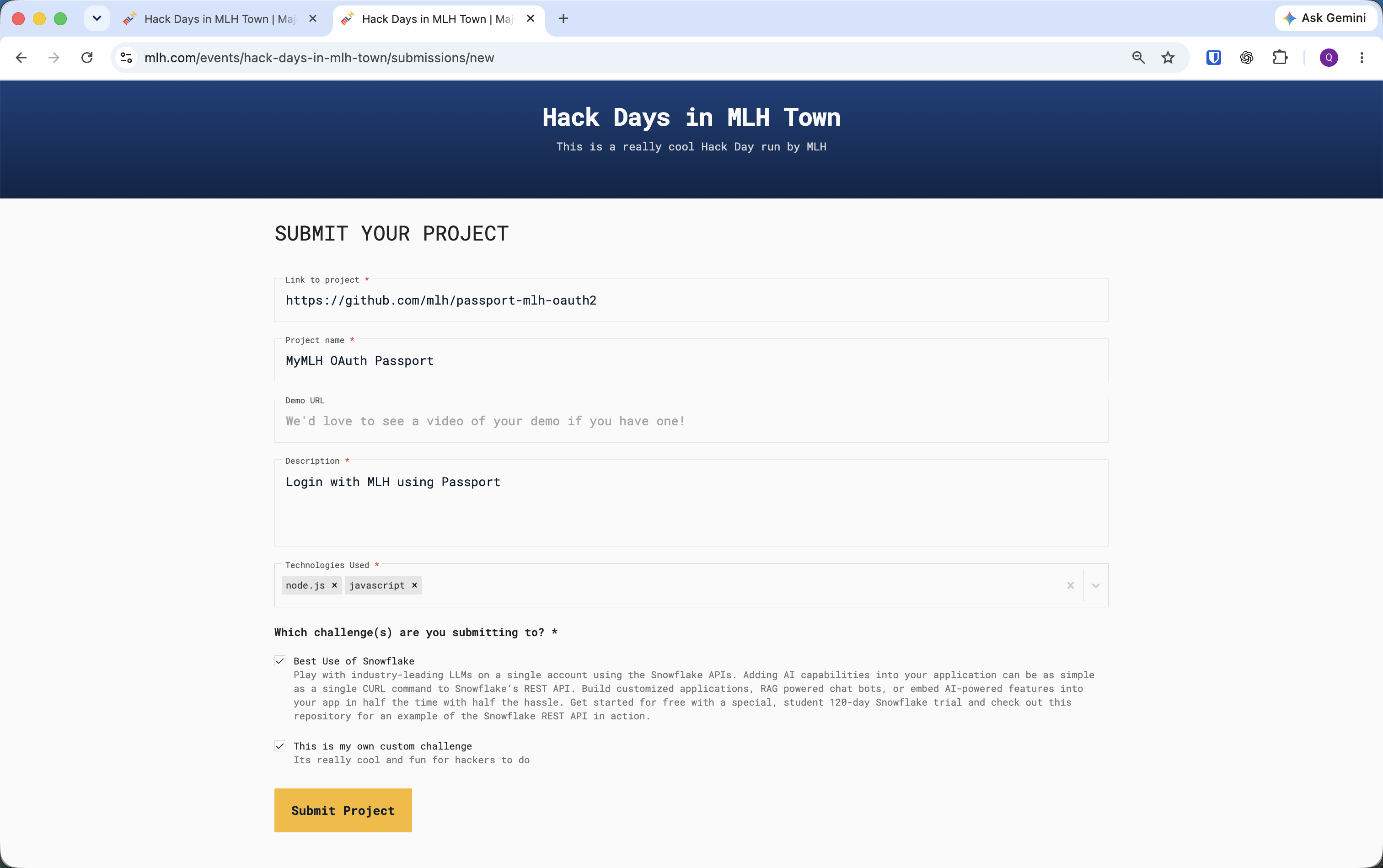
4. Enter the project link, project name, description, and technologies used.
5. Add a demo URL if the team has one.
6. Under **Which challenge(s) are you submitting to?**, select every Hacktoberfest, partner, and local challenge the project is eligible to enter.
7. Select **Submit Project** before the deadline.

<figure><img src="https://2418378681-files.gitbook.io/~/files/v0/b/gitbook-x-prod.appspot.com/o/spaces%2FYtpjvLijAu2exLXjlqsb%2Fuploads%2Fgit-blob-1d2babe7f603fda698656b60ad35d3d39ffa5b66%2Fchallenges-submissions-open.png?alt=media" alt="Example Hack Day Challenges page with an active Add Submission button"><figcaption><p>Teams start from the event's Challenges page while submissions are open. This example event uses different challenge names from Hacktoberfest.</p></figcaption></figure>

<figure><img src="https://2418378681-files.gitbook.io/~/files/v0/b/gitbook-x-prod.appspot.com/o/spaces%2FYtpjvLijAu2exLXjlqsb%2Fuploads%2Fgit-blob-7b0e7e54a0fcf84fd350119434de4aaa498b13d5%2Fproject-submission-form.png?alt=media" alt="Project submission form with project link, name, demo URL, description, technologies, and challenge selections"><figcaption><p>Complete the required project fields and select every eligible challenge before submitting.</p></figcaption></figure>

For the open-source challenge, the project link must be a public GitHub repository and the repository must make its open-source license clear. The submission form does not include a separate license-attestation field.

{% hint style="info" %}
The same project can appear once for every challenge it selected, and the total shown in Manage Submissions may count those challenge entries. This is expected; do not treat them as duplicate project forms.
{% endhint %}

## Verify Every Project Before Demos

Return to **Manage Submissions** before demos begin:

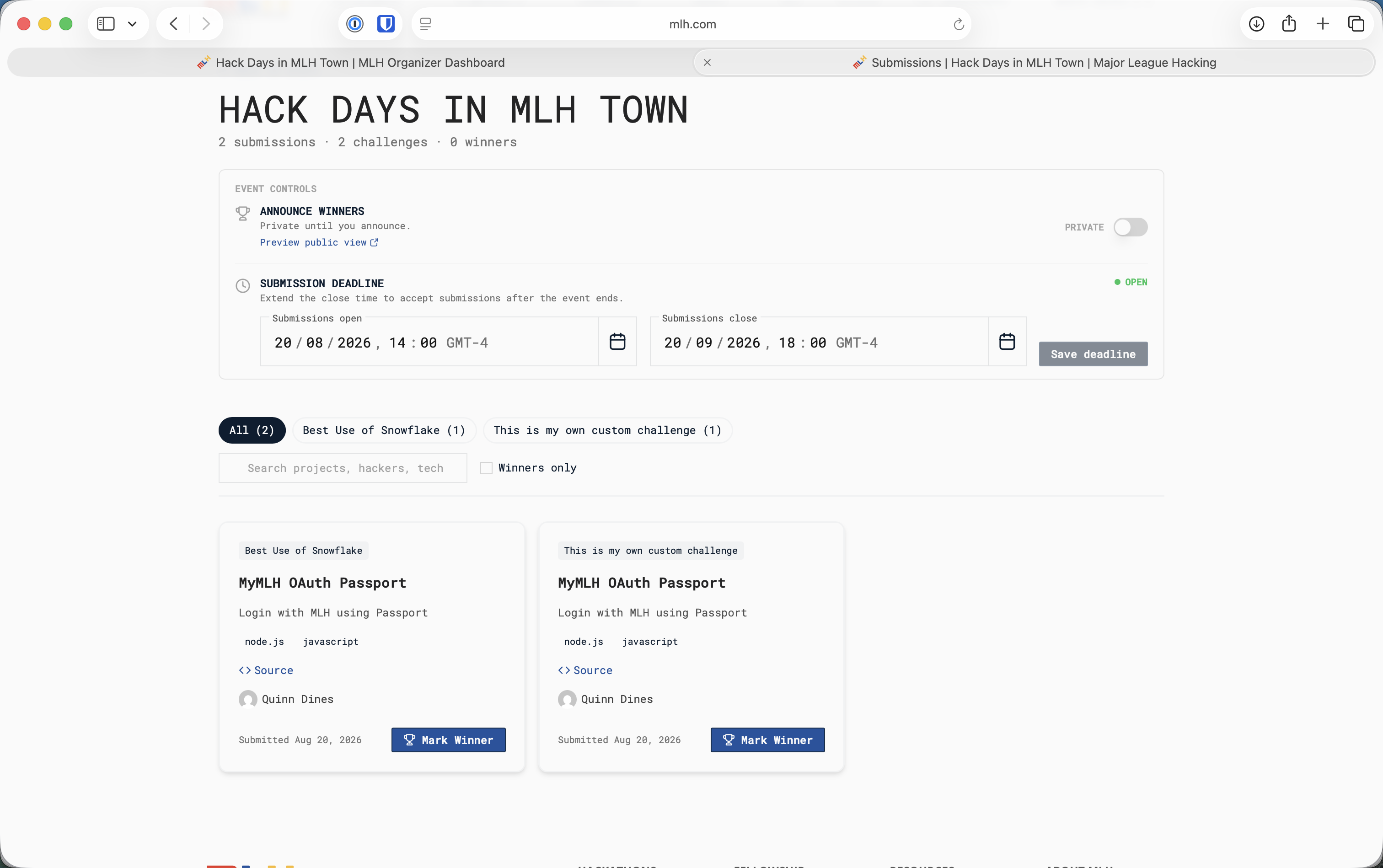
1. Identify each unique project in the **All** view and compare it with the teams scheduled to present. Do not rely on the headline total when projects entered more than one challenge.
2. Use the challenge tabs to confirm that the open-source challenge and each assigned partner category have the expected entries.
3. Search by project, hacker, or technology when you need to find a specific submission.
4. Ask a missing team to submit while the window remains open. Apply the same deadline policy to every team.
5. Confirm that the submission window is closed when demos begin, then refresh the list.

<figure><img src="https://2418378681-files.gitbook.io/~/files/v0/b/gitbook-x-prod.appspot.com/o/spaces%2FYtpjvLijAu2exLXjlqsb%2Fuploads%2Fgit-blob-180b4493b920fbec8e9a115f4c2dd655e619d3be%2Fmanage-submissions-projects.png?alt=media" alt="Manage Submissions page with project cards, challenge filters, search, and Mark Winner buttons"><figcaption><p>Review unique projects and use each challenge filter to confirm coverage before demos.</p></figcaption></figure>

## Choose the Winners

Give every eligible submission the same opportunity to present its work. Use the guidance on the relevant challenge page and confirm any repository, license, model, harness, or partner-technology requirements before selecting a winner.

Look for projects that:

* Meet the challenge requirements
* Work well enough to demonstrate
* Use the relevant technology as an important part of the project
* Show originality, learning, or thoughtful technical work
* Explain clearly what the team built and how it works

The Best Open-Source AI Project challenge has one winning team, and every member receives a DEV Badge on their DEV account. Depending on availability and your event's onboarding instructions, MLH may also provide MLH+DEV branded swag bags for the winning team. Any assigned Hack Days partner prize category uses the prize and eligibility instructions supplied for that category. Hacktoberfest does not use pull-request counts as the basis for these prizes.

## Mark Every Winner

Complete this process before announcing results in the room:

1. In **Manage Submissions**, filter to the relevant challenge.
2. Confirm that the selected project appears under that challenge and meets its requirements.
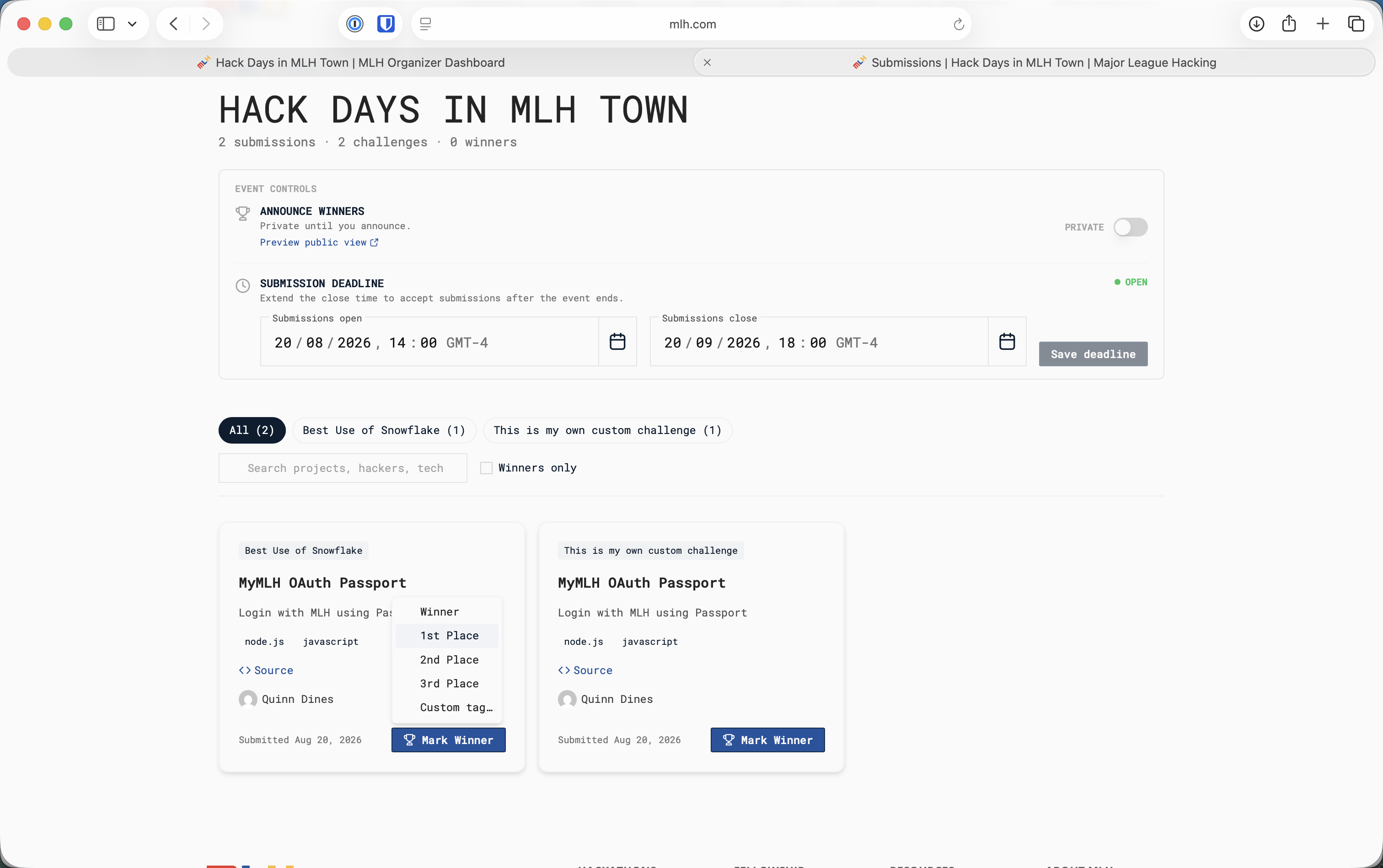
3. Select **Mark Winner** on the project card.
4. Select **Winner** from the menu.
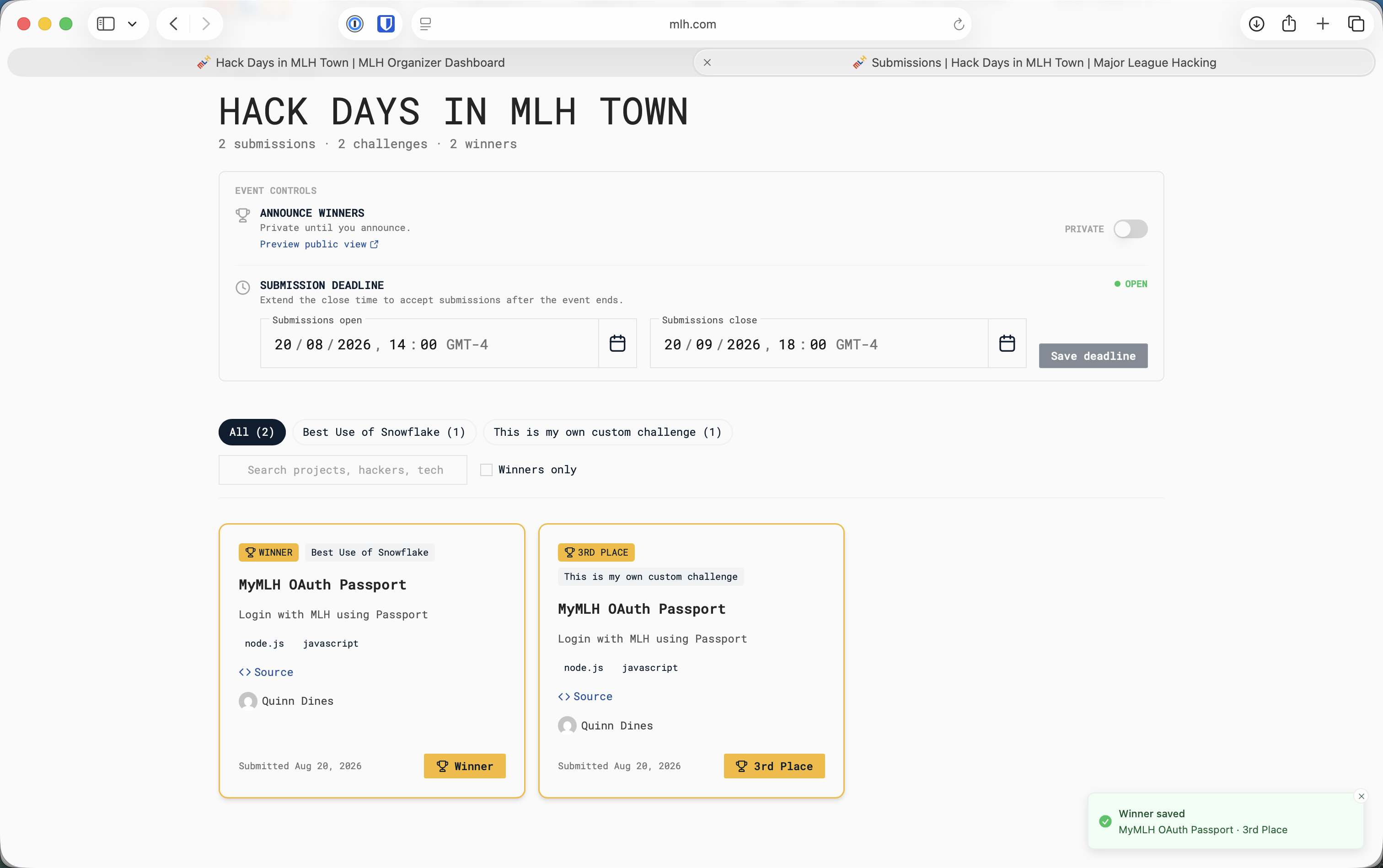
5. Confirm that the card has a gold **WINNER** badge and that the page reports **Winner saved**.
6. Repeat for the Best Open-Source AI Project challenge, every partner category MLH assigned, and any local challenge you added.

<figure><img src="https://2418378681-files.gitbook.io/~/files/v0/b/gitbook-x-prod.appspot.com/o/spaces%2FYtpjvLijAu2exLXjlqsb%2Fuploads%2Fgit-blob-aaeb81abb58a0c71a4258da54b50ce8d07349e9b%2Fmark-winner-menu.png?alt=media" alt="Mark Winner menu with Winner, ranked places, and custom tag options"><figcaption><p>Select Winner for the winning project in each challenge.</p></figcaption></figure>

<figure><img src="https://2418378681-files.gitbook.io/~/files/v0/b/gitbook-x-prod.appspot.com/o/spaces%2FYtpjvLijAu2exLXjlqsb%2Fuploads%2Fgit-blob-2309d66f2d3e4f3fd6649ce93f1f6700e24fcbe9%2Fwinner-saved.png?alt=media" alt="Manage Submissions page showing saved winner tags and a Winner saved confirmation"><figcaption><p>Verify the gold Winner badge and saved confirmation before moving on.</p></figcaption></figure>

Keep **Announce Winners** set to **PRIVATE** while selecting winners and checking results.

## Announce Winners and Publish the Gallery

After every winner is correct and you are ready to announce the results:

1. Use **Preview public view** to check how the gallery will appear.
2. In **Announce Winners**, switch the toggle from **PRIVATE** to **PUBLIC**.
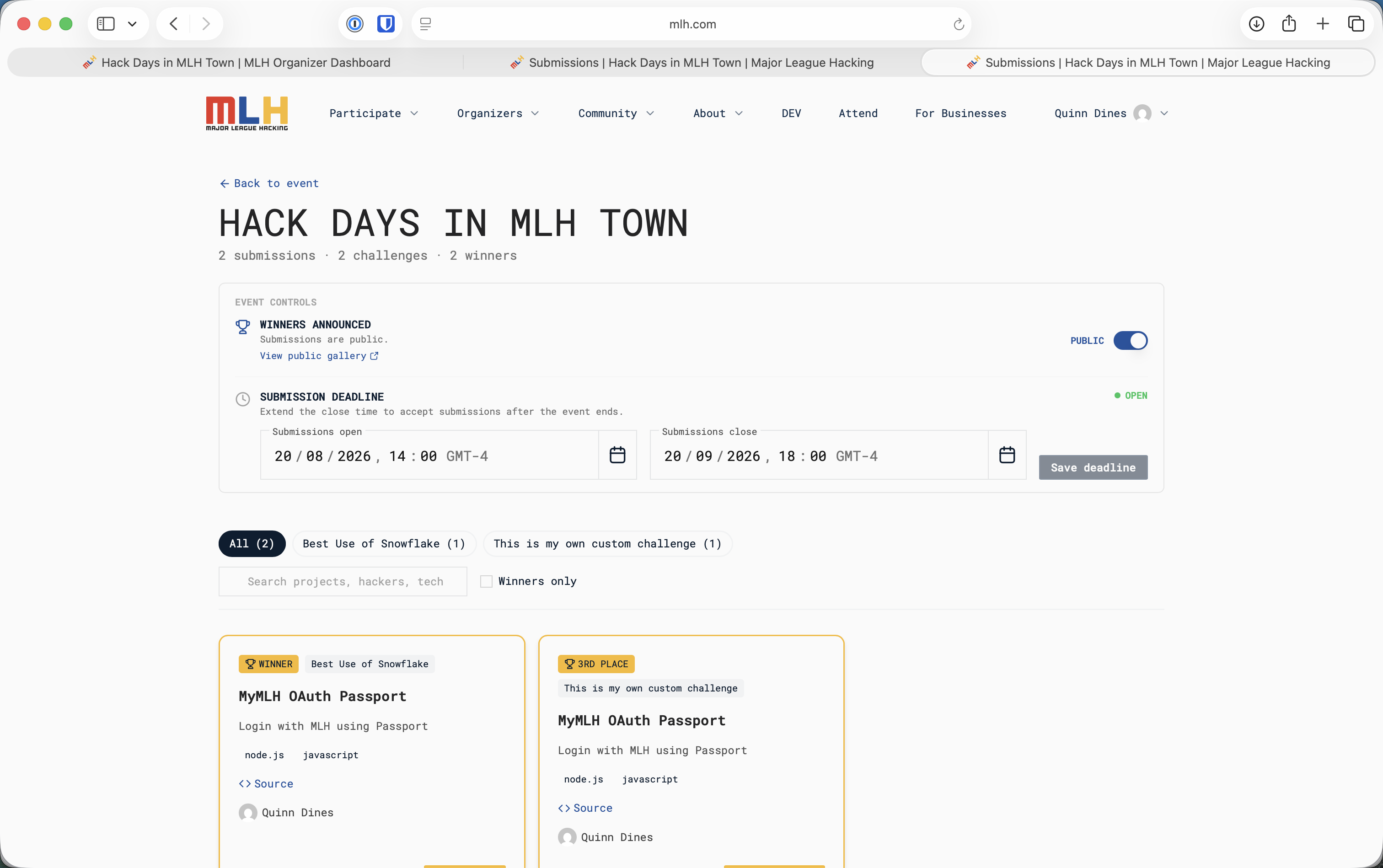
3. Confirm that the section now says **WINNERS ANNOUNCED** and **Submissions are public**.
4. Select **View public gallery** and check the published projects and winner labels.
5. Announce the results in the room exactly as they appear in OrganizerHQ.

<figure><img src="https://2418378681-files.gitbook.io/~/files/v0/b/gitbook-x-prod.appspot.com/o/spaces%2FYtpjvLijAu2exLXjlqsb%2Fuploads%2Fgit-blob-8ce6f21f60fce5e1334961fe36552e074d54ca32%2Fwinners-announced-gallery-public.png?alt=media" alt="Manage Submissions page with Announce Winners set to Public and a View public gallery link"><figcaption><p>Switch Announce Winners to Public only after every result has been checked.</p></figcaption></figure>

{% hint style="warning" %}
Making winners public also publishes the event's project gallery, including non-winning submissions. Check the projects before switching the toggle.
{% endhint %}


# OrganizerHQ Tutorial

{% hint style="danger" %}
**STOP! Check** [**this slide deck**](https://mlh.link/challenges-walkthrough) **for a quick start on OHQ features**
{% endhint %}

OrganizerHQ is Major League Hacking's event hosting platform. Every approved Fest must use OrganizerHQ to collect attendee registrations and check-ins. Hacktoberfest Hack Day events must also use OrganizerHQ Challenges for every project submission; an external submission page cannot replace it.

Completing your Fest application creates your event in OrganizerHQ. After approval, review the event details, add any missing venue or attendee information, publish the registration page, and test the public link before sharing it.

If you are hosting a Hacktoberfest Hack Day, you must also:

1. Confirm that the [Best Open-Source AI Project challenge](/fest-planning-guide/open-source-prize-categories) appears automatically on the event's **Challenges** page.
2. Confirm that any Hack Days partner category assigned by MLH also appears automatically. If an expected challenge is missing, contact MLH. Do not create a duplicate.
3. Use **Manage Submissions** to set the submission window and review every project.
4. Use the challenge filters and **Mark Winner** to record the open-source challenge winner and any assigned partner-category winners.
5. Keep **Announce Winners** private until every result is correct, then make it public to publish the project gallery before announcing results in the room.

## Add an Optional Local Challenge

MLH adds the Best Open-Source AI Project challenge and any assigned partner category automatically. You may also create a separate challenge for your own community:

1. Open the public event page while signed in as a host.
2. Select **Edit Event**.
3. In **Challenges**, select **+ Add Challenge**.
4. Complete the challenge details, then select **Publish**.
5. Return to the public Challenges page and confirm that the local challenge appears.

<figure><img src="https://2418378681-files.gitbook.io/~/files/v0/b/gitbook-x-prod.appspot.com/o/spaces%2FYtpjvLijAu2exLXjlqsb%2Fuploads%2Fgit-blob-25c0d2620344775caaeb01b6da713651d8331fd2%2Fadd-local-challenge.png?alt=media" alt="Event editing page showing an assigned MLH challenge and the Add Challenge control"><figcaption><p>Use Add Challenge for an optional local challenge. MLH adds the Hacktoberfest and assigned partner challenges automatically.</p></figcaption></figure>

Any prize for a local challenge is provided by the host unless your event onboarding says otherwise. If an MLH challenge is missing, contact MLH. Do not create a replacement.

Follow [Project Submissions and Winner Selection](/project-submissions-and-judging-for-hacktoberfest-hack-day) for the full current workflow and screenshots.

Have any questions or run into any problems while setting up your event? Email us at <hacktoberfest@mlh.io> and we will help you out.


# Fest Planning Guide

Use this guide after your event has been approved. Every Fest is a one-day, in-person event. Hacktoberfest Hack Days run for 3 to 12 hours, with four to six hours ideal. Attendee registration and check-in through OrganizerHQ and post-event photos are required for both formats.

This handbook covers the Hacktoberfest-specific requirements and workflows. For more general guidance on planning and running an event, use the [MLH Organizer Guide](https://guide.mlh.com/).

## Confirm Your Format

{% tabs %}
{% tab title="Hacktoberfest Hack Day" %}
Plan a free, hands-on event where participants create and submit projects for the [Best Open-Source AI Project challenge](/fest-planning-guide/open-source-prize-categories). Hacktoberfest Hack Day events are eligible to receive swag, subject to availability, and receive reimbursement under the current policy. Selected events may also receive an assigned Hack Days partner prize category.
{% endtab %}

{% tab title="Hacktoberfest Meetup" %}
Plan talks, demonstrations, discussions, social activities, workshops, or other community programming. Meetups do not use project submissions or prize challenges. Hacktoberfest Meetup events are eligible to receive swag, subject to availability, but do not receive prizes or reimbursement.
{% endtab %}
{% endtabs %}

{% stepper %}
{% step %}

## Reserve an In-Person Venue

* Choose a safe, accessible space that works for your activities and expected attendance. Hacktoberfest Hack Days run for 3 to 12 hours, with four to six hours ideal.
* Confirm reliable attendee Wi-Fi, enough power outlets, seating, tables, screens or projectors, and microphones when appropriate.
* Set aside space for OrganizerHQ check-in, swag distribution, food or beverages, speakers, and project demonstrations as needed.
* Ask about capacity, accessibility, security, insurance, catering restrictions, loading access, setup time, and any venue-specific rules or fees.
* Complete the [Safety and Code of Conduct](/fest-planning-guide/safety-and-code-of-conduct) checklist before the event.
  {% endstep %}

{% step %}

## Plan Food and Beverages

Food and beverages are optional. If you are hosting a Hacktoberfest Hack Day and plan to request reimbursement, review the [current reimbursement policy](/reimbursements) before spending. Hacktoberfest Meetup expenses are not reimbursable.

* Notify food vendors 3 to 7 days before the event to reduce last-minute issues.
* Order for a realistic attendance estimate rather than total registrations.
* Confirm plates, utensils, napkins, serving space, dietary information, and cleanup responsibilities.
* If beverages are not provided, ask attendees to bring a refillable water bottle.
  {% endstep %}

{% step %}

## Prepare OrganizerHQ

Every Fest must use OrganizerHQ for attendee registration and check-in. Hacktoberfest Hack Day events must also use OrganizerHQ Challenges for all project submissions. An external registration or submission page cannot replace the required OrganizerHQ workflow.

Make sure the event page includes:

* The approved event name
* Exact start and end times
* A specific venue address and arrival instructions
* A public host contact email
* An event description and schedule
* Accessibility information
* Food or beverage information
* Anything attendees should bring or install

See the [OrganizerHQ Tutorial](/organizerhq-tutorial) for more details.
{% endstep %}

{% step %}

## Receive and Distribute Swag

Both formats are eligible to receive Hacktoberfest swag, subject to availability. Confirm the delivery address, identify someone who can receive the shipment, plan how it will reach the venue, and decide how it will be distributed. Keep swag distribution separate from prize delivery.
{% endstep %}

{% step %}

## Communicate With Attendees

Keep your OrganizerHQ event page up to date. Send event-details messages when helpful for information not already covered by MLH's standard emails, such as the exact venue, schedule, accessibility information, arrival instructions, food or beverage details, and any software or preparation needed. Use the approved event name for consistency across events.
{% endstep %}
{% endstepper %}

## Copy-Ready Event Descriptions

{% tabs %}
{% tab title="Hacktoberfest Hack Day" %}

> Join \[Organization] for \[Approved Event Name], a one-day, in-person Hacktoberfest event where participants will build with open-source or open-weight AI, submit through OrganizerHQ Challenges, and compete in the Best Open-Source AI Project challenge. Bring your laptop and your curiosity!
> {% endtab %}

{% tab title="Hacktoberfest Meetup" %}

> Join \[Organization] for \[Approved Event Name], a one-day, in-person Hacktoberfest gathering focused on open-source and open-weight AI. The program will include \[Talks, Demonstrations, Discussions, Social Activities, etc.]. Come meet other members of the community, exchange ideas, and explore how open technology is changing the way we build.
> {% endtab %}
> {% endtabs %}

## During the Fest

As a host, you must:

* Use OrganizerHQ for attendee registration and check-in.
* Follow the [MLH Code of Conduct](https://github.com/MLH/mlh-policies/blob/main/code-of-conduct.md).
* Distribute the swag and promotional materials supplied for the event.
* Run the Fest format you were approved to host.
* Take event photos in accordance with the [Photography and Promotion guidance](/fest-planning-guide/photography-and-promotion).

If you are hosting a Hacktoberfest Hack Day, you must also:

* Tell participants when project work may begin. The [MLH Standard Hackathon Rules](https://github.com/MLH/mlh-policies/blob/main/standard-hackathon-rules.md) are the recommended default, but you may use a different approach if you explain it before the Fest.
* Collect every project through [OrganizerHQ Challenges](/project-submissions-and-judging-for-hacktoberfest-hack-day).
* Select a winner for the Best Open-Source AI Project challenge and any assigned Hack Days partner prize category.
* Mark one winning team for the open-source challenge and each assigned partner category in OrganizerHQ, then make the project gallery public before announcing the results.

## After the Fest

All hosts must provide event photos and any event summary, feedback, or attendance information requested by the MLH Hacktoberfest team. Hacktoberfest Hack Day hosts must also confirm their winners in OrganizerHQ, publish the project gallery, and submit complete, itemized receipts through the supplied reimbursement workflow.

For questions about planning your approved event, contact <hacktoberfest@mlh.io>.

## Event Checklist

* [ ] Confirm the approved format, official event name, and schedule. Hacktoberfest Hack Days run for 3 to 12 hours, with four to six hours ideal.
* [ ] Secure and inspect an in-person venue.
* [ ] Prepare the emergency plan and Code of Conduct process.
* [ ] Publish the schedule and attendee information in OrganizerHQ.
* [ ] Use OrganizerHQ for registration and check-in.
* [ ] If provided, receive and distribute Hacktoberfest swag.
* [ ] For Hacktoberfest Hack Day events, confirm that the Best Open-Source AI Project challenge appears in OrganizerHQ and use OrganizerHQ Challenges for every submission.
* [ ] For Hacktoberfest Hack Day events, follow the current reimbursement policy and keep itemized receipts.
* [ ] Take and submit event photos.
* [ ] Complete the required post-event reporting.


# So You're Thinking About Hosting a Fest

Hosting a Fest is a way to bring people together in person to learn, experiment, build, and share. Every Fest takes place on a single day. Hacktoberfest Hack Days run for 3 to 12 hours, with four to six hours ideal. You do not need a large team or elaborate production to create a useful event.

## Choose the Right Format

* **Hacktoberfest Hack Day:** choose this format when participants will build and submit new projects for a prize challenge. It is modeled on the [Hack Days program](https://mlh.gitbook.io/hack-days), must be free to attend, and is ideally around six hours long. Your event is eligible to receive swag, subject to availability, and reimbursement under the current policy. It runs the Best Open-Source AI Project challenge, with a DEV Badge for every member of the winning team and possible MLH+DEV branded swag bags depending on availability. Selected events may also receive an assigned Hack Days partner prize category.
* **Hacktoberfest Meetup:** choose this format for a talk, workshop, discussion, social event, or similar community gathering. Meetups do not use project submissions or prize challenges. Your event is eligible to receive swag, subject to availability, but not prizes or reimbursement.

## Getting Started

See the [Fest Planning Guide](/fest-planning-guide) for the full checklist. The high-level steps are:

{% stepper %}
{% step %}

## Apply to host a Fest

Apply at [hacktoberfest.com/host](https://hacktoberfest.com/host) and describe the format and organization or event name you want to use.
{% endstep %}

{% step %}

## Receive approval

Confirm the official event name after approval to make sure it looks good to your team.
{% endstep %}

{% step %}

## Secure an in-person venue

Choose a venue with the equipment and accessibility support your program needs.
{% endstep %}

{% step %}

## Plan the schedule

Hacktoberfest Hack Day events need project time, OrganizerHQ submission time, and time to choose the winners. Hacktoberfest Meetup events need a clear speaker or activity plan.
{% endstep %}

{% step %}

## Prepare attendee communications

Share the venue, schedule, arrival instructions, and any preparation required.
{% endstep %}

{% step %}

## Run the event

Distribute swag, take photos, and complete the post-event steps supplied by the MLH Hacktoberfest team.
{% endstep %}
{% endstepper %}

## Tips for a Great Fest

* Scope the event around the time, space, and volunteer support you actually have.
* Communicate early with attendees and with any speakers or volunteers involved in your program.
* Make the venue welcoming, accessible, and easy to navigate.
* For Hacktoberfest Hack Day events, make the [Best Open-Source AI Project challenge](/fest-planning-guide/open-source-prize-categories) visible from the start and explain what a strong submission should demonstrate.
* For Hacktoberfest Meetup events, make the session format and audience expectations clear.
* Take photos only with appropriate attendee permission and follow the [Photography and Promotion](/fest-planning-guide/photography-and-promotion) guidance.
* Use OrganizerHQ for attendee registration and check-in regardless of format.
* Stay flexible while continuing to run the Fest format you were approved to host.


# Fest Planning Timeline

{% stepper %}
{% step %}

## Four Weeks Before

* Apply to host a Fest at [hacktoberfest.com/host](https://hacktoberfest.com/host) and choose `Hacktoberfest Hack Day` or `Hacktoberfest Meetup`.
* Identify one day for the event. Hacktoberfest Hack Days run for 3 to 12 hours, with four to six hours ideal.
* Identify an in-person venue or realistic venue plan with reliable Wi-Fi, power, seating, and appropriate presentation equipment.
* Start planning attendee outreach and any speakers, volunteers, or collaborators your format needs.
* If you are hosting a Hacktoberfest Hack Day, review the [Best Open-Source AI Project challenge](/fest-planning-guide/open-source-prize-categories).
  {% endstep %}

{% step %}

## Two to Three Weeks Before

* Confirm your approved event name, venue, schedule, accessibility information, and event logistics.
* If food will be provided, finalize the vendor and review the reimbursement policy before spending.
* Set up the required OrganizerHQ event page, registration, and check-in workflow.
* Add a copy-ready event description, exact location, start and end times, host contact email, food information, accessibility information, and attendee preparation instructions.
* Confirm whether attendees need any venue-specific or event-specific information beyond MLH's standard emails.
* If you are hosting a Hacktoberfest Hack Day, confirm that the Best Open-Source AI Project challenge and any MLH-assigned partner category appear in OrganizerHQ, then decide how you will select each winner.
* If you are hosting a Hacktoberfest Meetup, confirm speakers, facilitators, session materials, and the run of show.
  {% endstep %}

{% step %}

## One Week Before

* Send an event-details message if attendees still need venue, schedule, or arrival information that is not already on the event page.
* Finalize the expected headcount and food or beverage order.
* If your Hacktoberfest event pack has arrived, prepare it for distribution.
* Complete the emergency plan and review the MLH Code of Conduct with volunteers.
* Test the OrganizerHQ registration and check-in process.
* If you are hosting a Hacktoberfest Hack Day, test the Challenges button and submission flow, then review the winner guidance for each challenge.
* Review the [Fest Opening Guide](/fest-planning-guide/fest-opening-guide) for the current status of the event materials.
  {% endstep %}

{% step %}

## Day of the Fest

* Set up the venue, signs, check-in area, swag, food, and program materials.
* Check in every attendee through OrganizerHQ.
* Welcome attendees and explain the Code of Conduct, schedule, and event format.
* Distribute swag and any event-provided materials.
* Take event photos throughout the program.
* If you are hosting a Hacktoberfest Hack Day, follow the project-start guidance you shared with participants, collect every submission through OrganizerHQ Challenges, select and mark every winner, make the gallery public, and then announce the results.
* If you are hosting a Hacktoberfest Meetup, run your talks, demonstrations, discussions, social activities, workshops, or other program.
  {% endstep %}

{% step %}

## After the Fest

* Submit the required event photos and any requested event summary, feedback, or attendance information.
* If you hosted a Hacktoberfest Hack Day, confirm the winners and public gallery in OrganizerHQ, then follow the reimbursement and prize instructions supplied by the MLH Hacktoberfest team.
* Encourage attendees to reflect on what they learned or built.
  {% endstep %}
  {% endstepper %}


# Open-Source AI Prize Challenge

Every `Hacktoberfest Hack Day` runs this challenge. MLH adds it to your OrganizerHQ event automatically. Include it in your project prompts, submission instructions, opening slides, and winner-selection plan.

## Best Open-Source AI Project

Build an original project that uses open-source or open-weight AI as an important part of how it works. Teams could create an agent skill, build with an open-weight large or small language model, or build or adapt an open-source model harness. These are examples within one challenge, and teams may combine them.

### Requirements

* Open-source or open-weight AI must be an important part of the project.
* The project must be published in a public GitHub repository and use an open-source license.
* An agent skill must comply with the Agent Skill Open Standard.
* A model-harness entry must include an original implementation or meaningful changes to an existing open-source harness.

## What These Terms Mean

* **Open source:** the project's source code is public and carries a license that allows others to use, modify, and share it. Common choices include [MIT](https://opensource.org/license/mit), [Apache-2.0](https://opensource.org/license/apache-2.0), and [GPL-3.0](https://opensource.org/license/gpl-3.0). The [OSI license list](https://opensource.org/licenses) includes more options.
* **Open-weight model:** the trained model weights are available to download or run under the model provider's terms. Open-weight does not automatically mean that every part of a model is open source, so teams should name the model and link its license or terms in the README.
* **Small and large language models:** for this challenge, a small language model has 10 billion parameters or fewer, while a large language model has more than 10 billion parameters. Google's [Gemma model overview](https://ai.google.dev/gemma/docs/core) includes examples on both sides of that boundary.
* **Agent skill:** a reusable set of instructions and supporting files that follows the [Agent Skills open standard](https://agentskills.io/).
* **Model harness:** the software around a model that manages prompts, tools, memory, context, and actions. Teams may build one from scratch or make meaningful improvements to an existing open-source project such as OpenCode, Hermes Agent, OpenClaw, or Pi.

## What a Strong Entry Looks Like

A strong project:

* Uses open-source or open-weight AI as an important part of how the project works
* Solves a clear problem or creates a useful experience
* Shows substantial technical work completed by the team
* Makes its source, license, model, and key dependencies easy to verify
* Has a working demonstration and a clear explanation of what the team built

Use this guidance alongside [Project Submissions and Winner Selection](/project-submissions-and-judging-for-hacktoberfest-hack-day). Ask teams to show the relevant code and explain the contribution of the AI technology in plain language.

## Prize

The challenge has one winning team. Every member receives a DEV Badge on their DEV account. Depending on availability and your event's onboarding instructions, MLH may also provide MLH+DEV branded swag bags for the winning team. These may include a branded bag, notebook, and other items.

## Hack Days Partner Prize Categories

Hack Days partner prize categories are separate from the Best Open-Source AI Project challenge. They may be assigned to selected Hacktoberfest Hack Day events by the MLH Hacktoberfest team. You may indicate a preference when applying, but an assigned category appears automatically in OrganizerHQ. See the [partner challenge details](/hack-days-partner-modules).


# Photography and Promotion

Event photos are required for both Fest formats. They help document the community around Hacktoberfest and show the impact of the program. Photos should present the event as welcoming, active, and useful without compromising attendee privacy or dignity.

## What to Highlight

Aim for a varied set of photos that includes:

* Hosts and participants collaborating, plus any speakers or facilitators involved in the program
* Participants working together on projects or activities
* Project demonstrations, winner announcements, talks, workshops, discussions, and show-and-tell moments
* Opening and closing moments, including winning teams at Hacktoberfest Hack Day events
* The venue, signage, and local character of the organization hosting the Fest
* Hacktoberfest, MLH, and assigned partner branding in the context of the event
* Swag distribution and community interaction
* Wide and group shots that reflect the range of people participating
* Any distinctive activity that gives the Fest its own personality

Indoor event spaces can be poorly lit. Check the lighting before the program begins and use a mix of wide, medium, posed, and candid photos.

## What to Avoid

* Photos of people who have not given appropriate permission
* Sensitive screens, personal information, or private conversations
* Close-up individual headshots when they do not show the event itself
* Sleeping participants or people in vulnerable or embarrassing situations
* Software filters that substantially change the photo
* Messy food areas, discarded packaging, or half-eaten food as the primary subject
* Images of unsafe conditions; address the condition instead of photographing it

## After the Fest

Select a clear, representative set of photos and submit them through the post-event workflow supplied by the MLH Hacktoberfest team. Keep the original files available until the event reporting is complete.

Use the approved event name in posts and follow any current Hacktoberfest brand guidance supplied by the MLH Hacktoberfest team.


# Securing and Preparing Your Venue

Secure an in-person venue and agree on the practical details needed to run your Fest.

Use this page to secure a suitable venue and agree on the practical details with your school, company, community organization, or venue contact. You can also copy the relevant summary below when requesting approval.

## Copyable Venue Request

Replace the bracketed text before sending.

{% tabs %}
{% tab title="Hacktoberfest Hack Day" %}

> We are requesting approval to host **\[Event Name]**, a free, one-day, in-person Hacktoberfest Hack Day for approximately **\[number] attendees** on **\[date]**, from **\[start time] to \[end time]**. Participants will work in teams to create open-source AI projects, submit them through MLH's OrganizerHQ platform, and share their work at the event. The program follows the [MLH Code of Conduct](https://github.com/MLH/mlh-policies/blob/main/code-of-conduct.md). We are looking for a space with reliable Wi-Fi, power, seating, and **\[A/V or other needs]**, with access from **\[setup time] to \[breakdown time]**. **\[Host name]** will manage attendees, the program, check-in, and event closeout; we need the venue's help with building access, facilities, and local safety requirements.
> {% endtab %}

{% tab title="Hacktoberfest Meetup" %}

> We are requesting approval to host **\[Event Name]**, a one-day, in-person Hacktoberfest Meetup for approximately **\[number] attendees** on **\[date]**, from **\[start time] to \[end time]**. The program will include **\[talks, workshops, demonstrations, discussions, or other activities]** focused on open-source AI. It is a community event rather than a project competition. The program follows the [MLH Code of Conduct](https://github.com/MLH/mlh-policies/blob/main/code-of-conduct.md). We are looking for a space with **\[Wi-Fi, seating, A/V, or other needs]**, with access from **\[setup time] to \[breakdown time]**. **\[Host name]** will manage attendees, the program, check-in, and event closeout; we need the venue's help with building access, facilities, and local safety requirements.
> {% endtab %}
> {% endtabs %}

## Before Confirming the Venue

Agree on:

* The room, expected attendance, and maximum capacity
* The event date and published start and end times
* Setup, delivery, attendee-entry, and breakdown times
* Who can open and close the building and who will be reachable during the event
* Any rental, security, insurance, cleaning, food, or equipment costs
* Rules for visitors, minors, photography, catering, deliveries, and building access

Whenever possible, use a venue that does not charge a rental fee. Hacktoberfest Meetups do not receive reimbursement. For a Hacktoberfest Hack Day, get advance approval from MLH before committing to a venue charge or another expense not clearly covered by the [reimbursement policy](/reimbursements).

## Check the Space

Make sure the venue has:

* Enough tables, chairs, and usable space for the planned format
* Reliable attendee Wi-Fi and enough power outlets, with safe cable routing
* Any screen, projector, microphone, or audio equipment your program needs
* A clear space near the entrance for OrganizerHQ check-in
* Accessible entrances, event rooms, restrooms, and routes through the venue
* Clearly marked exits and a known evacuation or emergency procedure
* A suitable place for food, swag, and deliveries when applicable

Hack Days also need comfortable project workspace and a simple area for short demos or project review. Meetup layouts should match the planned talks, workshops, discussions, or social activities.

Test the Wi-Fi, A/V equipment, OrganizerHQ links, and any QR codes using the devices you will use on event day.

## Safety and Accessibility

Before the event, confirm the venue address, evacuation routes, local emergency contacts, the on-site venue contact, and the lead host. Make it clear how attendees can request an accommodation or report a concern.

Use [Safety and Code of Conduct](/fest-planning-guide/safety-and-code-of-conduct) for the required event plan and the main MLH Organizer Guide for more detailed advice on [locking down a venue](https://guide.mlh.com/general-information/locking-down-a-venue).


# Safety and Code of Conduct

Every Fest must provide a safe, welcoming, and accessible environment. These requirements apply to both Hacktoberfest Hack Day and Hacktoberfest Meetup.

## MLH Code of Conduct

Everyone involved in the Fest must follow the [MLH Code of Conduct](https://github.com/MLH/mlh-policies/blob/main/code-of-conduct.md).

Before the event:

* Link the Code of Conduct from the OrganizerHQ event page and attendee communications.
* Identify the host or venue representative attendees can approach with a concern.
* Make sure volunteers know how to respond to a report and how to contact venue security or emergency services.
* Review the current MLH incident-reporting procedures and contact information in the Code of Conduct.

At the event, explain that harassment and abuse are not tolerated and that the policy applies throughout the venue and during every Fest-related activity. Escalate possible violations promptly and protect the privacy of anyone who reports a concern.

## Emergency Plan

Create a written emergency plan and make it available to hosts and volunteers. Keep a physical or offline copy at the venue in case internet access is unavailable.

Plan for scenarios that are relevant to your venue, including:

* Fire, evacuation, or severe weather
* A medical emergency
* Power or internet failure
* Theft, missing equipment, or another security concern
* An attendee who is lost, distressed, or needs assistance
* A Code of Conduct report or other unsafe behavior

The plan should include:

* The venue address and evacuation routes
* Local emergency and non-emergency contact numbers
* Venue security and the on-site venue contact
* Lead host and backup host contact information
* Instructions for communicating with attendees during an incident
* A plan for pausing, relocating, or ending the event if necessary

At least one designated event lead must be present, reachable, and alert throughout the Fest. In an emergency, stay calm, isolate the immediate risk when it is safe to do so, and follow the directions of venue staff and emergency responders.

For more detailed planning guidance, see the main MLH Organizer Guide's [Prepare Your Emergency Plan](https://guide.mlh.com/general-information/event-logistics/prepare-your-emergency-plan) and [Locking Down a Venue](https://guide.mlh.com/general-information/locking-down-a-venue) pages.

## Accessibility and Venue Safety

Before attendees arrive, verify that:

* Entrances, program rooms, restrooms, and emergency exits are accessible.
* Walkways, power cables, equipment, and furniture do not create avoidable hazards.
* The venue’s capacity, fire, food, security, insurance, and visitor rules are understood.
* Attendees know how to request an accommodation or report a venue issue.
* Emergency exits and evacuation instructions are visible and unobstructed.

Contact <hacktoberfest@mlh.io> if you need help applying these requirements to your approved Fest.


# Fest Opening Guide

{% hint style="warning" %}
**The Fest slide deck is not ready yet.** The MLH Hacktoberfest team will post the deck and its format-specific instructions on this page when it is available.
{% endhint %}

## How to Use the Opening Slide Deck

Once the deck is posted, make a copy for your Fest. Edit only the host-controlled slides; the slide numbers may change, so use the slide titles and placeholders to identify what to update.

{% stepper %}
{% step %}

## Make a Copy

Open the event-specific slide deck provided by the MLH Hacktoberfest team and go to **File → Make a copy**. Make your edits in the copy.
{% endstep %}

{% step %}

## Update Your Event Information

Replace the placeholders with:

* The approved event name
* The venue, city, date, and schedule
* Your host and organization information
* The community or communication channel
* OrganizerHQ registration and check-in details
* Any preparation attendees should complete before arriving

Hacktoberfest Hack Day events should show project time, submissions, winner selection, and when project work may begin. Hacktoberfest Meetup events should show talks, demonstrations, discussions, social activities, workshops, or other sessions.
{% endstep %}

{% step %}

## Update the Links

Update any QR codes and links so they point to your event-specific pages:

* Community or communication channel
* OrganizerHQ registration and check-in page
* OrganizerHQ Challenges submission page for every Hacktoberfest Hack Day event
* Speaker, workshop, or resource links
  {% endstep %}

{% step %}

## Add the Prize Information

For a Hacktoberfest Hack Day event, include the [Best Open-Source AI Project challenge](/fest-planning-guide/open-source-prize-categories) and its DEV Badge prize. Mention MLH+DEV branded swag bags only if your event's onboarding materials confirm them. If the MLH Hacktoberfest team has also assigned a Hack Days partner prize category, include it exactly as provided.

Hacktoberfest Meetups do not use project submissions or prize challenges, so omit prize language.
{% endstep %}
{% endstepper %}

## Quick Checklist

* [ ] Updated the title with the approved event name, location, and date
* [ ] Added host and organization information
* [ ] Filled in the schedule with actual times
* [ ] Updated community, registration, check-in, and submission links
* [ ] Added the Best Open-Source AI Project challenge and its DEV Badge prize
* [ ] Added only the Hack Days partner prize category assigned by the MLH Hacktoberfest team
* [ ] Tested embedded videos and links


# Partner Challenges

Selected Hacktoberfest Hack Day events may receive one additional partner prize category. The MLH Hacktoberfest team assigns the category and adds it to OrganizerHQ automatically; hosts do not need to create it.

Use the page for your assigned category to find the participant-facing challenge copy, resources, opening materials, winner guidance, and expected prize:

* [Google Gemma](/hack-days-partner-modules/partner-challenge-google-gemma)
* [Snowflake](/hack-days-partner-modules/partner-challenge-snowflake-coco)
* [Solana](/hack-days-partner-modules/partner-challenge-solana)
* [GitHub Copilot](/hack-days-partner-modules/partner-challenge-github-copilot)

Your event onboarding remains the source of truth for its assigned category and prize details. If an assigned category is missing from OrganizerHQ, contact <hacktoberfest@mlh.io>. Do not create a replacement, although you may still add your own local challenges.

Every Hack Day also runs the separate [Best Open-Source AI Project challenge](/fest-planning-guide/open-source-prize-categories).


# Google Gemma

Challenge copy, participant resources, opening materials, and winner guidance for the Google Gemma category.

**Last reviewed:** August 2026

Google supports Major League Hacking and the Hack Days program with AI tools for experimentation and rapid prototyping. This category gives hackers a chance to build with Gemma, Google's family of lightweight, open models.

## Best Use of Gemma 4

It’s time to see how much you can build with a lightweight, open model. Gemma 4 packs multimodal intelligence into an open-weights model that you can access through the Gemini API. Gemma 4 can help you:

* Work with text and images to create an assistant that understands more of what users share
* Build a focused AI tool for learning, creativity, productivity, or your community
* Experiment with an open model while using the Gemini API to move quickly from an idea to a working prototype

Bring your idea to life… what will you build with Gemma 4 today?

## Participant Resources

Share these resources before and during the event:

* [Gemma 4 resources](https://mlh.link/gemma)
* [Gemma Quickstart](https://mlh.link/gemma-quickstart)
* [Gemma API docs](https://mlh.link/gemma-docs)
* [Gemma Beginner Guide](https://mlh.link/gemma-beginnerguide)

## Opening Ceremony

Use the opening ceremony materials included in your event onboarding.

## Choosing the Winner

Confirm that the winning project actually uses a Gemma model through the Gemini API. Ask the team to identify the model in its README and show the integration in its code or demonstration.

## Expected Prize

Prizes vary by region and available inventory. Depending on the event, the winning team may receive an MLH+DEV branded swag bag, a mechanical keyboard, or a digital gift card. Swag bags may include a branded bag, notebook, and other items. Check your event's onboarding materials before sharing prize details with participants.


# Snowflake

Challenge copy, participant resources, opening materials, and winner guidance for the Snowflake category.

Snowflake supports Major League Hacking with tools for building data and AI applications. Snowflake CoCo is its AI coding agent for data work, available on the web, desktop, and command line.

## Best Open-Source AI Project with Snowflake

Use Snowflake CoCo to find or understand a freely accessible dataset in Snowflake, then build an open-source AI project around it.

* Explore the Snowflake Marketplace or Snowflake sample data with CoCo
* Use CoCo to understand the dataset, write queries, or create a data pipeline
* Build an AI application, agent, analysis, or other useful experience with open-source code

Eligible projects combine all three elements: CoCo, a freely accessible Snowflake dataset, and open-source or open-weight AI.

## Participant Resources

Share these resources before and during the Fest:

* [Snowflake CoCo overview](https://docs.snowflake.com/en/user-guide/cortex-code/cortex-code)
* [Snowflake CoCo trial](https://signup.snowflake.com/cortex-code/)
* [Explore Snowflake Marketplace listings](https://docs.snowflake.com/en/collaboration/consumer-listings-exploring)
* [Snowflake sample datasets](https://docs.snowflake.com/en/user-guide/sample-data)

## Opening Slides

Use the Hacktoberfest Snowflake opening slides included in your event onboarding. Make a copy and edit only the host-controlled slides.

## Choosing the Winner

The project must use open-source or open-weight AI, use a freely accessible Snowflake dataset, and be published in a public GitHub repository with an open-source license. Ask the team to identify the dataset and show how CoCo helped them explore the data or build the project.

## Expected Prize

**Arduino Tiny Machine Learning Kit**

Check your event's onboarding materials before sharing prize details with participants, as availability may vary by region.


# Solana

Challenge copy, participant resources, opening materials, and winner guidance for the Solana category.

The Solana Agent Registry is an open, onchain protocol for giving AI agents verifiable identities, portable reputation, and validation records. It gives participants a practical way to explore how people and software can decide which agents to trust.

## Best Use of the Solana Agent Registry

Build an open-source project that uses the Solana Agent Registry to give an AI agent a verifiable identity, make reputation easier to understand, or record useful validation data.

* Register an agent with a verifiable onchain identity
* Build a way to discover agents or understand their reputation and feedback
* Use validation records to help people or other agents make safer decisions

## Participant Resources

Share these resources before and during the Fest:

* [Solana Agent Registry](https://solana.com/agent-registry)
* [Solana Hack Day resources](https://mlh.link/solana)
* [Solana documentation](https://mlh.link/solana-docs)
* [Solana tutorials](https://mlh.link/solana-tutorials)
* [Solana templates](https://mlh.link/solana-templates)

## Opening Slides

Use the Hacktoberfest Solana opening slides included in your event onboarding. Make a copy and edit only the host-controlled slides.

## Choosing the Winner

Confirm that the winning project uses the Solana Agent Registry as an important part of the experience. Ask the team to show the relevant code and the registration, reputation, feedback, validation, or other onchain interaction during its demonstration. The project must be published in a public GitHub repository with an open-source license.

## Expected Prize

[**Ledger Nano S Plus**](https://www.amazon.com/dp/B0DJTKY4PS)

Check your event's onboarding materials before sharing prize details with participants, as availability may vary by region.


# GitHub Copilot

Challenge copy, participant resources, opening materials, and winner guidance for the GitHub Copilot category.

GitHub Copilot acts as an AI pair programmer while participants plan, write, test, and document their projects.

## Best Hack Built with GitHub Copilot

Build an open-source AI project with GitHub Copilot. This category focuses on how the team used Copilot during development.

* Describe what you need in natural language and use Copilot to create a starting point
* Explore an unfamiliar model, framework, API, or open-source codebase
* Generate boilerplate, tests, queries, or documentation so you can focus on the core experience

Publish the project in a public GitHub repository with an open-source license. Explain in the README or demo where GitHub Copilot helped the team learn, solve a problem, test an implementation, or document the project.

## Participant Resources

Students can get GitHub Copilot through the GitHub Student Developer Pack. Use [mlh.link/GitHub](https://mlh.link/GitHub) for fast-tracked access. If student verification is still pending, participants can use the available free tier or trial.

## Opening Slides

Use the [GitHub Copilot opening ceremony deck](https://mlh.link/hackdays-github-slides). Make a copy and edit only the host-controlled slides. Use the Hacktoberfest challenge copy on this page in place of the standard Hack Days category.

## Choosing the Winner

Choose a working open-source AI project that demonstrates clear and useful use of GitHub Copilot. The public repository must include an open-source license, and the README or demo must give specific examples of how Copilot helped the team build it.

## Expected Prize

**Wireless Headphones**

Check your event's onboarding materials before sharing prize details with participants, as availability may vary by region.


# Hacktoberfest Hack Day Offboarding Checklist

Work through this checklist to close out a `Hacktoberfest Hack Day`. Before the Fest begins, assign one host to collect the photos, confirm the OrganizerHQ records, and submit everything MLH needs.

Reimbursement depends on these steps being completed, so do not leave them until the deadline approaches.

{% stepper %}
{% step %}

## Before the Fest Ends

* [ ] Every attendee is checked in through OrganizerHQ while physically present at the venue.
* [ ] Registrations, online participation, and advance or remote check-ins have not been counted as check-ins.
* [ ] Every presenting team has submitted a project.
* [ ] Itemized receipts have been collected and passed to whoever is submitting them.
* [ ] Photos have been taken in line with the venue's consent, privacy, and guardian-permission requirements.
  {% endstep %}

{% step %}

## Record Your Winners

* [ ] Each winning project is recorded in OrganizerHQ before the result is announced in the room.
* [ ] A winner is marked under the [Best Open-Source AI Project challenge](/fest-planning-guide/open-source-prize-categories).
* [ ] A winner is marked under any [Hack Days partner prize category](/hack-days-partner-modules) assigned to the event.
* [ ] Each winner meets the repository, license, model, harness, or partner-technology requirements for its challenge.
* [ ] Winners were recorded only for the Best Open-Source AI Project challenge, any partner category assigned by MLH, and any optional local challenge run by the host.
* [ ] The project gallery was checked and made public through **Announce Winners** before results were announced in the room.

See [Project Submissions and Winner Selection](/project-submissions-and-judging-for-hacktoberfest-hack-day) for the full workflow.
{% endstep %}

{% step %}

## Photos and Event Summary

* [ ] Photos cover collaboration, projects and demos, the opening and closing, the community, and MLH or partner presence.
* [ ] No photo shows anyone who declined to be photographed.
* [ ] No photo exposes screens, badges, or documents containing personal information.
* [ ] Attendee names are not published alongside images without permission.
* [ ] The event summary has been submitted, reporting checked-in attendance, submitted projects, confirmed winners, a short description of what happened, and host feedback.

See [Photography and Promotion](/fest-planning-guide/photography-and-promotion) for guidance on what to capture and what to avoid.
{% endstep %}

{% step %}

## Receipts and Reimbursement

* [ ] The Fest was approved as `Hacktoberfest Hack Day`, was free to attend, and took place entirely in person.
* [ ] Every expense claimed is eligible and supported by a complete itemized receipt.
* [ ] Receipts have been submitted through the workflow supplied by the MLH Hacktoberfest team, by the deadline in the approval or onboarding materials.
* [ ] Nothing has been claimed that was purchased independently without advance approval.

{% hint style="warning" %}
Reimbursement is the lower of your approved itemized spending and your country's per-hacker rate multiplied by verified in-person OrganizerHQ check-ins, capped at 50 hackers. MLH cannot reimburse more than you spent.
{% endhint %}

See [Reimbursements](/reimbursements) for the current policy. `Hacktoberfest Meetup` events do not receive reimbursement.
{% endstep %}

{% step %}

## Materials and Prizes

* [ ] Event materials were distributed according to the onboarding instructions.
* [ ] The event's confirmed prize information, including any MLH+DEV branded prize swag bags, was communicated accurately to attendees.
* [ ] Attendees were told that prize formats may vary by availability and that some winners may receive digital gift cards instead of physical prizes.
* [ ] Undistributed materials are stored securely and handled according to the onboarding instructions.
* [ ] Any host-funded prizes were kept separate from MLH-provided prizes and reimbursement claims unless approved in advance.

See [Swag](/swag) for what an event pack contains.
{% endstep %}
{% endstepper %}

## Final Check

* [ ] Every attendee check-in is complete in OrganizerHQ.
* [ ] Every presenting team submitted a project.
* [ ] Every winner is confirmed in OrganizerHQ.
* [ ] The public project gallery is visible and shows the correct winner labels.
* [ ] Photos follow the event's consent requirements.
* [ ] The event summary has been submitted.
* [ ] Itemized receipts have been submitted.

{% hint style="info" %}
If you cannot find a form, a deadline, or a Ramp invitation, email <hacktoberfest@mlh.io> immediately after your Fest. The reimbursement window may close while you wait.
{% endhint %}

Direct winner questions about delayed or missing prizes to <hacktoberfest@mlh.io> with the event name, the category, and the recorded winning project.


# Frequently Asked Questions (FAQ)

<details>

<summary>What is a Fest?</summary>

A Fest is an in-person Hacktoberfest event. For more details, [please click here](/).

</details>

<details>

<summary>What is the difference between Hacktoberfest Hack Day and Hacktoberfest Meetup?</summary>

Hacktoberfest Hack Day events are hands-on events modeled on the [MLH Hack Days program](https://mlh.gitbook.io/hack-days). If participants will build and submit projects for a prize challenge, choose Hacktoberfest Hack Day. Approved Hacktoberfest Hack Day events are eligible to receive swag, subject to availability, receive reimbursement under the current policy, and run the Best Open-Source AI Project challenge.

Hacktoberfest Meetup events are more flexible in format. If your program will consist of talks, demonstrations, discussions, social activities, or workshops, choose Hacktoberfest Meetup. Meetups do not use project submissions or prize challenges. They are eligible to receive swag, subject to availability, but do not receive prizes or reimbursement.

</details>

<details>

<summary>What open-source AI prize challenge does a Hack Day run?</summary>

Every Hacktoberfest Hack Day runs the [Best Open-Source AI Project challenge](/fest-planning-guide/open-source-prize-categories). It has one winning team, and every member receives a DEV Badge on their DEV account. Depending on availability and your onboarding instructions, MLH may also provide MLH+DEV branded swag bags for the winning team. Hack Days partner prize categories are separate and appear only when MLH assigns one to your event.

</details>

<details>

<summary>Can I add a challenge for my own community?</summary>

Yes. MLH adds the Best Open-Source AI Project challenge and any assigned partner category automatically. You may add a separate local challenge through **Edit Event → + Add Challenge**. Keep it clearly separate from the MLH challenges, and provide any local prize yourself unless your onboarding instructions say otherwise.

See [Add an Optional Local Challenge](/organizerhq-tutorial#add-an-optional-local-challenge) for the steps.

</details>

<details>

<summary>Do I need judges or mentors for my Fest?</summary>

No. Mentors are optional, and a Hack Day does not require a judging panel. The host can select the winners during project demos using the guidance for each challenge.

See [Project Submissions and Winner Selection](/project-submissions-and-judging-for-hacktoberfest-hack-day) for the submission, winner, and public-gallery workflow.

</details>

<details>

<summary>Can I host an online or hybrid Fest?</summary>

No. These Fest formats are in-person events only. Please see [Hacktoberfest.com](https://hacktoberfest.com/) to learn more about our virtual event offerings.

</details>

<details>

<summary>How long is a Fest?</summary>

Every Fest takes place in person on a single day. Hacktoberfest Hack Days must run for at least 3 hours and may not exceed 12 hours; four to six hours is ideal. Meetups may be shorter.

</details>

<details>

<summary>Where can I host a Fest?</summary>

You can apply to host a Fest in your local community. Your event must use an approved, in-person venue and meet the requirements in this handbook.

</details>

<details>

<summary>Can one organization host more than one Fest?</summary>

Yes, in different cities. We cannot support several Fests from the same team in the same city or metro area because we want to reach communities in more locations.

If your organization wants to host in more than one city, have a different member of your organization apply for each individual event, and include your organization's name in the event name field on every application so we can see that they belong together.

We'd also appreciate an email at <hacktoberfest@mlh.io> before you apply, so we know a group of applications is on its way and can plan for it.

</details>

<details>

<summary>Where do I apply?</summary>

Use the [Hacktoberfest application](https://hacktoberfest.com/host). The application will ask about your organization, proposed event, format, venue, and program. The MLH Hacktoberfest team aims to approve events within approximately one week. For an update on your application, contact <hacktoberfest@mlh.io>.

</details>

<details>

<summary>When should I apply?</summary>

Apply as soon as you have a workable event idea and enough information for the MLH Hacktoberfest team to review it. We need at least a few weeks' notice; ideally, apply four weeks in advance. We may consider applications with less notice on a case-by-case basis.

</details>

<details>

<summary>Can I apply with a tentative date?</summary>

We ask that you have a confirmed date in mind before submitting your application because it helps us with planning. If your plans change and you need to postpone, make sure the new date is still within the October window and notify us at <hacktoberfest@mlh.io> as soon as you make the change.

</details>

<details>

<summary>What are the maximum and minimum numbers of participants for a Fest?</summary>

There are no strictly enforced maximum or minimum numbers of participants for a Fest. That being said, we typically find that the ideal size for these events is between 25 and 50 participants. This allows the event to be large enough to facilitate new connections across your community but small enough to stay within our reimbursement limits, which cap at 50 participants (see Reimbursements for more).

</details>

<details>

<summary>Is there a deadline to apply?</summary>

There is no fixed deadline, but the sooner you apply the more likely we are to be able to support your event during October. Applying early gives us time to review, confirm, and get swag to you before your date.

If an application reaches us too late to be included in Hacktoberfest, we may convert it to a traditional Hack Day event to be run in November instead, so it is still worth applying even if you are running late.

</details>

<details>

<summary>How are applications reviewed, and what do you look for?</summary>

Your event needs to meet the eligibility criteria set out in this handbook, including an in-person event held on a single day with a suitable venue. Hacktoberfest Hack Days must also be free to attend and run for 3 to 12 hours; four to six hours is ideal. The [Fest Formats](/fest-formats) and [Securing and Preparing Your Venue](/fest-planning-guide/host-and-venue-guide) pages cover these in full.

For now we review all applications on a first-come, first-served basis. If applications begin to outpace our capacity, we may prioritize regions with relatively few existing Hacktoberfest events.

</details>

<details>

<summary>How do registration and check-in work?</summary>

Every Fest must use OrganizerHQ for attendee registration and check-in. Hacktoberfest Hack Day events must also use OrganizerHQ Challenges for all project submissions; another submission page cannot replace it. Follow the OrganizerHQ instructions supplied with your approval and see the [OrganizerHQ Tutorial](/organizerhq-tutorial) for more details.

</details>

<details>

<summary>Who counts toward my check-in total?</summary>

Reimbursement is calculated from verified in-person attendee check-ins in OrganizerHQ. Check attendees in only while they are physically present; registrations, remote participation, and advance check-ins do not count.

</details>

<details>

<summary>What reporting is required for every Fest?</summary>

Attendee registration and check-in through OrganizerHQ and post-event photos are required for both Fest formats. Follow any additional reporting instructions supplied by the MLH Hacktoberfest team for your approved event.

</details>

<details>

<summary>Can you send funds in advance of the event?</summary>

Unfortunately no, we can only reimburse actual expenses after the event has taken place and in accordance with our reimbursement policies.

</details>

<details>

<summary>Do I need a specific theme?</summary>

Your event should broadly match Hacktoberfest's open-source and open-weight AI theme, but you can customize it to suit your community.

</details>

<details>

<summary>Can I use my own branding alongside Hacktoberfest's?</summary>

Yes. Your organization's or community's branding is welcome alongside the approved Hacktoberfest branding.

</details>

<details>

<summary>What support does each format receive?</summary>

Both formats are eligible to receive Hacktoberfest swag, subject to availability. Hacktoberfest Hack Day events also receive reimbursement under our current policy limits and run the Best Open-Source AI Project challenge. Selected Hacktoberfest Hack Day events may receive an assigned Hack Days partner prize category. Hacktoberfest Meetup events do not receive reimbursement or prize categories.

</details>

<details>

<summary>What is in the swag pack and when does it arrive?</summary>

Every approved Fest, in both formats, is eligible to receive a Hacktoberfest event pack. Availability, shipping eligibility, partner assignment, and event timing may affect whether your event receives physical materials. Event packs normally include T-shirts, stickers, and postcards and may include other promotional materials. Some events also receive surprise swag drops while supplies last.

When T-shirts are included, quantities are limited. We send a set number for the Fest, so decide in advance how you want to hand them out. Please don't tell attendees that everyone will get one. We aim to send swag packs before the event start date, but in rare cases the pack may arrive after the event because of shipping delays.

Sticker and postcard quantities are based on your expected attendance. We confirm the exact contents and shipping timing once your event is approved. Surprise drops and partner items are not guaranteed, so wait for confirmation before promising them to attendees.

Every member of the winning Best Open-Source AI Project team receives a DEV Badge. Depending on availability and your event's onboarding instructions, MLH may also provide MLH+DEV branded swag bags for the winning team. Any assigned Hack Days partner prize category is handled separately after the Fest and is not part of the general swag distribution.

</details>

<details>

<summary>Will I have to pay customs or import charges on my swag?</summary>

No. MLH handles or reimburses customs duties on event packs, so you shouldn't be out of pocket. If you're asked to pay a charge on delivery, keep the documentation and let us know at <hacktoberfest@mlh.io>.

</details>

<details>

<summary>What expenses can be reimbursed?</summary>

Food, snacks, and non-alcoholic beverages are always eligible. Other event expenses may be eligible with advance approval. Review [Reimbursements](/reimbursements) and email <hacktoberfest@mlh.io> before making an uncertain purchase.

</details>

<details>

<summary>What does a receipt or invoice need to show?</summary>

Keep a complete, itemized receipt for every purchase you intend to claim. Follow the receipt requirements in your Ramp invitation and event onboarding materials, and review [Reimbursements](/reimbursements) before spending.

</details>

<details>

<summary>When do I submit receipts, and when will I be paid?</summary>

Submit receipts by the deadline in your event approval or onboarding materials. Payment typically takes 30 days from submission, although it can take a few weeks more or less depending on individual circumstances. If a Ramp invitation or deadline is missing, email <hacktoberfest@mlh.io>.

</details>

<details>

<summary>Can the reimbursement limit be increased for my event?</summary>

The published country rate and 50-hacker cap apply unless your event approval lists a different rate. If your approval differs from the handbook, follow the approval and email <hacktoberfest@mlh.io> so the guide can be corrected. You may run a larger event, but reimbursement remains capped at the applicable maximum and cannot exceed approved, itemized spending.

</details>

<details>

<summary>Can I volunteer instead of hosting?</summary>

We love that you want to get involved, and the most direct way to do it is to host a Fest yourself. We don't run a central volunteer list, so we aren't able to place people with events in their area.

If hosting alone feels like more than you have capacity for right now, consider getting a few friends or people from your community together and hosting as a team. Sharing the organizing work is a common and very effective way to run a Fest, and a Hacktoberfest Meetup can be as simple as a talk, a workshop, or a social gathering around open source.

</details>

<details>

<summary>Can someone from the MLH team attend my event?</summary>

No. With Fests running around the world throughout October, MLH team members cannot attend each event in person. Use this guide to plan and run your Fest, and contact <hacktoberfest@mlh.io> with questions before, during, or after the event.

</details>

<details>

<summary>Who should I contact with questions?</summary>

Feel free to reach out to us at <hacktoberfest@mlh.io> with any other questions.

</details>